
Sonis is your single source of truth for your semester schedule.
Use Sonis to confirm:
- Class days
- Class times
- Class meeting frequency
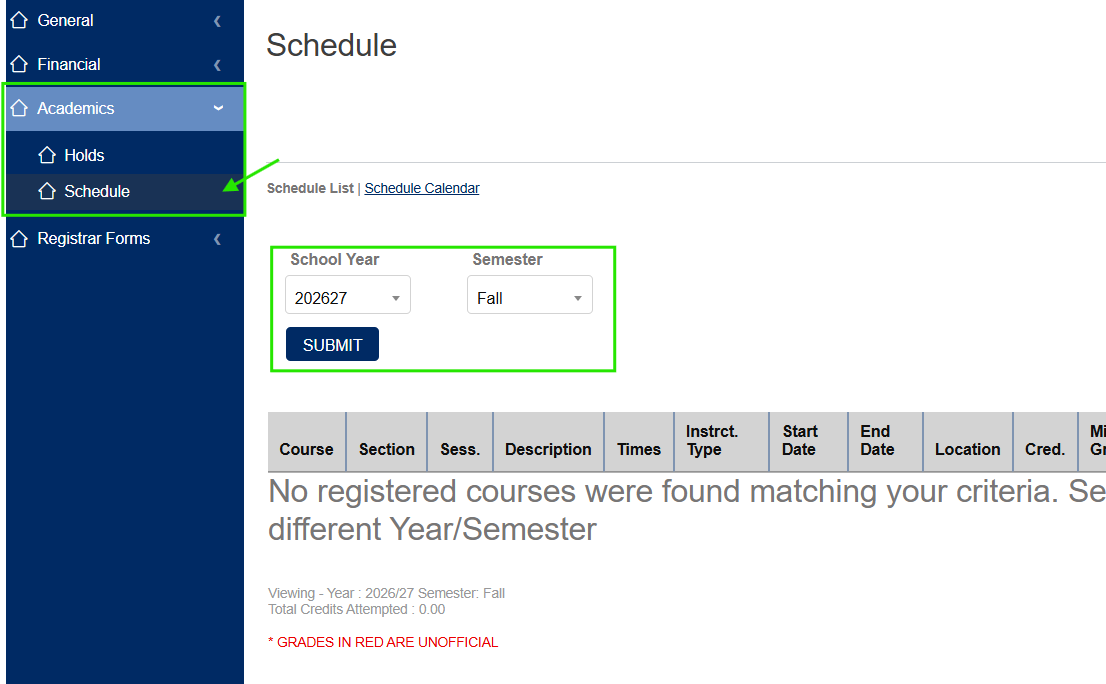
To view your schedule in Sonis:
-
Navigate to the "Academics” tab and “Schedule”section.
-
Select the academic year and semester in the drop-down menus.
IMPORTANT: Time Zones in Sonis
Undergraduate RTC class times in Sonis are displayed in Central Time (CST). This display is a fixed time zone and cannot be changed.
Note: Graduate and ACH schedules display in Pacific Time (PST).
Canvas is your source of truth for accessing course content after the start of the semester.
Use Canvas to confirm:
- Access course content (after the start of the semester)
Access course course Zoom links
IMPORTANT: Time Zones in Canvas
- Canvas may default to Pacific Time (PST) - but you can update it to your time zone.
How to update your time zone in Canvas:
- Reset your time zone in two places (see videos below):
- Changing Time Zones (Canvas Video)
- Changing Time Zones (Zoom Video)
- Changing Time Zones (Canvas Video)
- Full step-by-step directions with screenshots are available here.
Time Zone Calculator
|
PST |
MST |
CST (Sonis Display) |
EST |
|
4:00 PM |
5:00 PM |
6:00 PM |
7:00 PM |
|
5:15 PM |
6:15 PM |
7:15 PM |
8:15 PM |
|
6:30 PM |
7:30 PM |
8:30 PM |
9:30 PM |
|
9:00 AM |
10:00 AM |
11:00 AM |
12:00 PM |